
In Brief (TL;DR)
Adopting the Secure Hub pattern on Google Cloud transforms PSD2 compliance into a scalable architecture for secure banking interoperability.
Apigee acts as a strategic gateway to manage eIDAS certificates and mTLS authentication, ensuring protected communications between TPPs and banks.
Centralized management of OAuth flows and encryption of sensitive data ensure maximum protection of customer financial information.
The devil is in the details. 👇 Keep reading to discover the critical steps and practical tips to avoid mistakes.
In today’s fintech landscape, the PSD2 (Payment Services Directive 2) is no longer a regulatory novelty, but the de facto operating standard for banking interoperability. However, for software architects and DevOps engineers, the challenge has shifted from simple compliance to the implementation of robust, scalable, and, above all, secure architectures. When connecting a proprietary CRM to customer bank accounts via banking APIs, psd2 api security becomes the fundamental pillar upon which the entire infrastructure rests.
This technical guide explores how to build a secure API gateway using the Google Cloud ecosystem, with a specific focus on Apigee as the mediation layer. We will analyze the architectural patterns necessary to handle mTLS authentication, complex OAuth 2.0 flows, sensitive data (PII) encryption, and operational resilience against third-party bank latencies.

Prerequisites and Architectural Context
Before diving into code and configurations, it is necessary to define the operational perimeter. In an Open Banking scenario, your application typically acts as a TPP (Third Party Provider), specifically as an AISP (Account Information Service Provider) or PISP (Payment Initiation Service Provider).
To follow this guide, we assume the availability of:
- An active Google Cloud Platform (GCP) account.
- A configured instance of Apigee X or Apigee Hybrid.
- Valid eIDAS certificates (QWAC and QSEAL), required for formal identification towards European banks.
- Basic knowledge of containers (if using Cloud Run/GKE for CRM microservices).
The “Secure Hub” Architecture
The recommended approach is the “Secure Hub” pattern. Instead of allowing the CRM to directly call bank APIs, an API Gateway (Apigee) is interposed to act as a single point of security policy enforcement. The data flow is as follows:
CRM (Backend) → Google Cloud Apigee (Gateway) → ASPSP (Bank API)
1. Implementing mTLS (Mutual TLS) for Server-to-Server Authentication
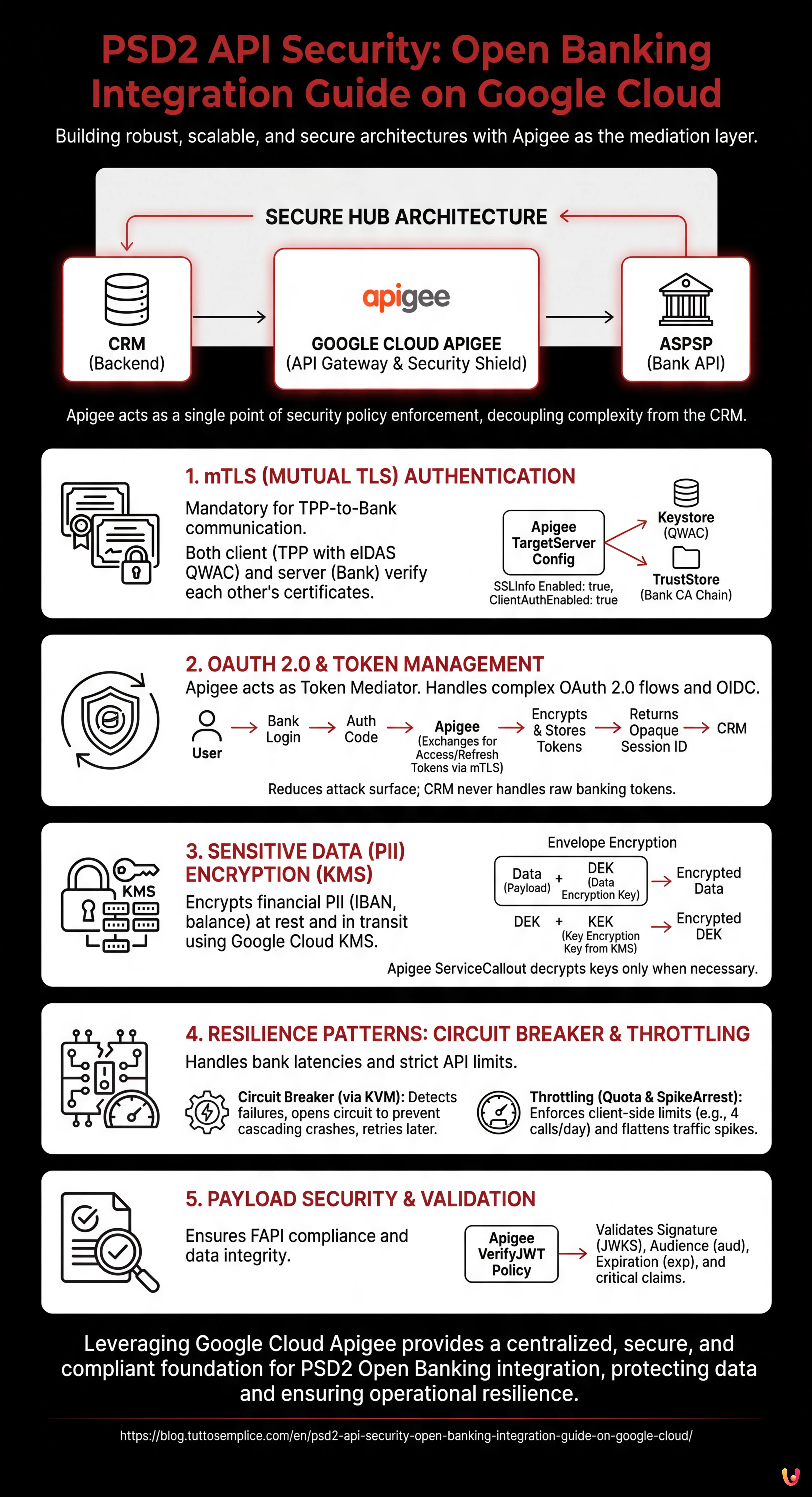
According to the PSD2 Regulatory Technical Standards (RTS), simple API Key authentication is not sufficient for communication between TPP and Bank. The use of Mutual TLS (mTLS) is mandatory.
In mTLS, not only does the client (you) verify the server certificate (the bank), but the bank must also verify your client certificate (the eIDAS QWAC certificate). Here is how to configure it on Apigee:
Keystore and TargetServer Configuration
In Apigee, mTLS management towards the backend (the bank) is handled through the definition of TargetServers.
- Certificate Upload: Upload your QWAC certificate (public and private key) to the Apigee Keystore.
- SSLInfo Definition: In the TargetServer configuration, enable SSL and reference the Keystore.
<TargetServer name="Bank-API-Target">
  <Host>api.banca-partner.com</Host>
  <Port>443</Port>
  <IsEnabled>true</IsEnabled>
  <SSLInfo>
    <Enabled>true</Enabled>
    <ClientAuthEnabled>true</ClientAuthEnabled>
    <KeyStore>ref://my-qwac-keystore</KeyStore>
    <KeyAlias>my-key-alias</KeyAlias>
    <TrustStore>ref://bank-truststore</TrustStore>
  </SSLInfo>
</TargetServer>
Technical Note: Ensure that the TrustStore contains the full chain of the CA that issued the bank’s certificate, otherwise the handshake will fail.
2. Token Management: OAuth 2.0 and OIDC

psd2 api security requires that access to account data be explicitly authorized by the end user via Strong Customer Authentication (SCA). Technically, this translates to the OAuth 2.0 Authorization Code Grant flow.
Apigee’s Role as Token Mediator
Your CRM should never directly handle raw bank access tokens unless strictly necessary. A secure pattern involves Apigee handling the token exchange and providing the CRM with an internal opaque token.
- Redirect: The user is redirected to the bank’s portal for login.
- Callback: The bank returns an
authorization_codeto your callback endpoint on Apigee. - Token Exchange: Apigee calls the bank’s
/tokenendpoint using mTLS and exchanges the code for anaccess_tokenand arefresh_token. - Secure Storage: Apigee encrypts these tokens and stores them in its secure cache (or an external encrypted database), returning a session identifier to the CRM.
This approach reduces the attack surface: if the CRM database is compromised, attackers will not find valid banking tokens.
3. Sensitive Data (PII) Encryption with Google Cloud KMS
Financial data (IBAN, balance, transactions) are critical PII (Personally Identifiable Information). GDPR and PSD2 compliance mandates encryption both in transit (already covered by TLS 1.2+) and at rest.
Envelope Encryption
For enterprise-grade security, use Google Cloud Key Management Service (KMS). Never hardcode encryption keys in code or Apigee configurations.
Implement an Envelope Encryption strategy:
- Use a DEK (Data Encryption Key) to encrypt the banking response payload before it is saved or logged.
- Use a KEK (Key Encryption Key) managed by Cloud KMS to encrypt the DEK.
In Apigee, you can use a ServiceCallout policy to invoke Cloud KMS APIs and decrypt keys only when necessary for processing, keeping data obfuscated in system logs.
4. Resilience Patterns: Circuit Breaker and Throttling
Banking APIs, especially those of legacy institutions adapted to PSD2, can suffer from unpredictable latencies or downtime. A CRM waiting indefinitely for a bank response offers a poor User Experience and risks a cascading crash.
Implementing the Circuit Breaker
The Circuit Breaker pattern prevents an error in an external service (the bank) from saturating your system resources.
In Apigee, there is no native out-of-the-box “Circuit Breaker” policy, but it can be implemented by combining KVM (Key Value Maps) and conditional logic:
- If a call to the TargetServer fails or times out, increment a counter in KVM.
- If the counter exceeds a threshold (e.g., 5 errors in 1 minute), activate an “Open Circuit” flag.
- Subsequent requests are immediately rejected with a custom 503 error, without attempting to contact the bank, allowing the external system to recover.
- After a cool-down period, the circuit switches to “Half-Open” state to test connectivity again.
Throttling Management (Spike Arrest and Quota)
Banks impose strict limits on the number of API calls (e.g., 4 calls per day for background balance refreshes). Exceeding these limits can lead to the temporary blocking of your TPP certificate.
Use the Apigee Quota policy to apply these limits on the client side:
<Quota name="CheckBankLimits">
    <Interval>1</Interval>
    <TimeUnit>day</TimeUnit>
    <Allow count="4"/>
    <Identifier ref="request.header.account_id"/>
    <Distributed>true</Distributed>
</Quota>
To protect your backend from sudden traffic spikes, use the SpikeArrest policy, which flattens traffic peaks by distributing them over time.
5. Certificate Validation and Payload Security
Beyond transport, it is vital to validate content. According to FAPI (Financial-grade API) specifications, often adopted in the PSD2 scope, JWT tokens must be signed and sometimes encrypted.
Use the Apigee VerifyJWT policy to ensure that tokens received from the bank are valid and not tampered with. Configure the policy to validate:
- The signature (using the bank’s public key exposed via JWKS).
- The audience (
audclaim) to ensure the token is intended for you. - The expiration (
expclaim).
Conclusions

Implementing psd2 api security is not a trivial task; it requires a layering of network protocols (mTLS), authorization standards (OAuth 2.0/OIDC), and software engineering practices (Circuit Breakers). By using Google Cloud Apigee as a central hub, you centralize complexity, allowing your CRM to remain lightweight and focused on business logic, while the gateway takes charge of cryptographic and regulatory compliance.
Remember that security is a continuous process: constantly monitor logs (obfuscated) via Google Cloud Operations Suite and keep your QWAC certificates updated to avoid service interruptions.
Frequently Asked Questions

To implement the Mutual TLS required by technical standards, you must configure TargetServers in Apigee by uploading the eIDAS QWAC certificate to the Keystore. You need to enable SSLInfo and ensure the TrustStore contains the bank’s full CA chain, ensuring both parties verify their respective digital identities before data exchange.
The recommended approach is to use Apigee as a token mediator, preventing the CRM from directly handling raw access tokens. The gateway exchanges the authorization code with the bank, encrypts the resulting tokens in a secure cache, and returns only an opaque session identifier to the backend, drastically reducing the attack surface in case of a CRM database breach.
To protect critical data like IBANs and balances, one must adopt Envelope Encryption using Google Cloud KMS. Instead of inserting static keys in the code, a Data Encryption Key is used to encrypt the payload and a Key Encryption Key managed by KMS to protect the key itself, decrypting data only at the moment of processing via specific policies.
It is fundamental to implement resilience patterns like the Circuit Breaker using Apigee Key Value Maps to stop calls to unresponsive banks, avoiding bottlenecks. Furthermore, the use of Quota and SpikeArrest policies allows respecting strict limits imposed by financial institutions, preventing TPP certificate blocking due to excessive requests.
Using a centralized gateway allows adopting the «Secure Hub» pattern, where regulatory and cryptographic complexity is decoupled from the CRM business logic. Apigee centrally manages mTLS, token validation, and throttling, acting as a protective shield and ensuring that security policies are applied uniformly to all transactions towards banking institutions.



Did you find this article helpful? Is there another topic you'd like to see me cover?
Write it in the comments below! I take inspiration directly from your suggestions.