

In the modern internet era, digital identity management requires increasingly advanced solutions to counter cyber threats. The Yahoo Account Key represents one of the most effective responses to this need, completely eliminating the necessity to memorize and type complex credentials. This passwordless authentication system transforms your smartphone into a true access key, guaranteeing a superior level of security for your Yahoo Mail inbox and simplifying the daily user experience.
What Yahoo’s passwordless technology is and how it works
The yahoo account key is an advanced authentication system that replaces the traditional password with a push notification sent to your smartphone. This method guarantees rapid and secure access to Yahoo Mail, verifying your digital identity via a simple tap on the screen.
According to official Yahoo documentation, when you attempt to access your account from any device (such as a desktop computer or a tablet), the server will no longer ask you to enter a text string. Instead, it will send an encrypted authorization request directly to the Yahoo Mail app installed on your main mobile device. A notification will appear on the phone screen with details of the login attempt (including location and browser); you simply need to tap the confirmation icon to instantly unlock the session on the requesting device. This process leverages asymmetric cryptographic security protocols, inextricably linking access to physical possession of your smartphone.
Benefits for security and digital identity
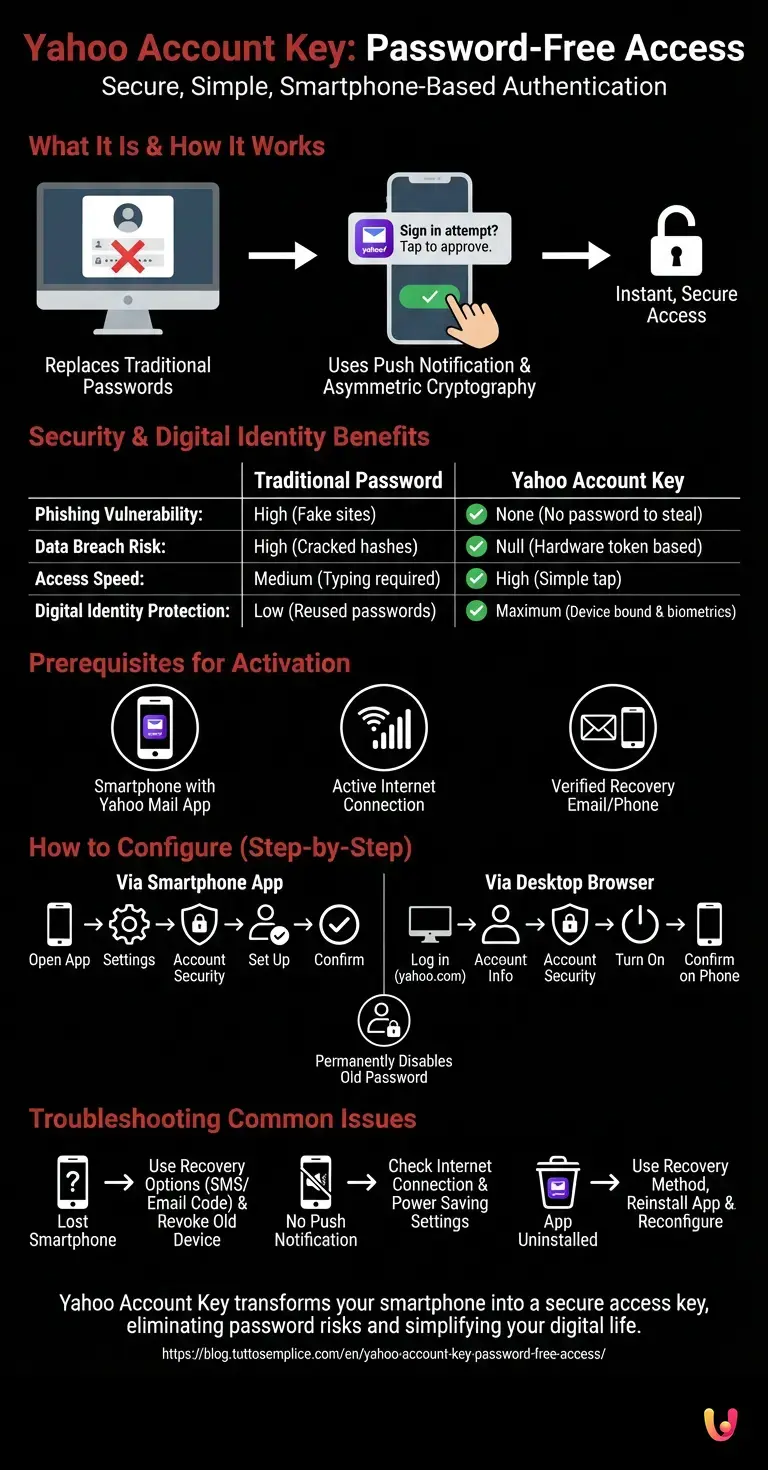
Using the yahoo account key eliminates risks linked to credential theft, such as phishing or data breaches. According to industry cybersecurity data, mobile device-based authentication strengthens digital identity by making unauthorized access nearly impossible.
Switching to a password-free system offers tangible benefits that go far beyond simple convenience. Below is a detailed comparison between the traditional method and Account Key technology:
| Feature | Traditional Password | Yahoo Account Key |
|---|---|---|
| Phishing Vulnerability | High (user can be tricked into entering it on fake sites) | None (there is no password to type or steal) |
| Data Breach Risk | High (if servers are breached, hashes can be cracked) | Null (authentication depends on the phone’s hardware token) |
| Access Speed | Medium (requires typing and memory) | High (just a tap on the smartphone screen) |
| Digital Identity Protection | Low (passwords are often reused) | Maximum (bound to the physical device and phone biometrics) |
Prerequisites for activation
To enable the yahoo account key, you must possess a smartphone with the official Yahoo Mail app installed and updated. Additionally, an active internet connection on the mobile device and a recovery email address or phone number associated with the profile are required.
Before proceeding with configuration, ensure you have the following fundamental elements available to guarantee a smooth transition towards password-free access:
- A smartphone (iOS or Android) with the latest version of the Yahoo Mail app downloaded from the official store.
- Current access to your Yahoo account (you will need to log in with your old password for the last time).
- A verified mobile number or a secondary email address registered in security settings, fundamental for recovery procedures.
- Push notifications enabled for the Yahoo Mail app within your phone’s operating system settings.
How to configure Yahoo Account Key step by step
Configuring the yahoo account key takes a few minutes and can be started directly from your profile’s security settings. Once the mobile device is linked, the system will disable the old password, permanently switching to access via push approval.
The activation process is designed to be intuitive. You can decide to start the procedure either directly from your mobile device or by using a desktop browser. Both methods will lead to the same result of securing the account.
Activation via smartphone
Activating the yahoo account key via the mobile app is the most direct method. By accessing the Yahoo Mail application settings on your phone, it is possible to enable the password-free access function, securely binding the device to your digital identity.
Follow these steps on your iOS device or Android:
- Open the Yahoo Mail app and tap your profile icon in the top left.
- Select Settings and subsequently tap Manage accounts.
- Choose the Account security option (you may be asked to unlock the screen with your phone’s PIN or biometrics).
- Scroll to find the section dedicated to Yahoo Account Key and tap Set up.
- Follow the on-screen instructions to test the push notification. Once receipt is confirmed, the system will ask if you wish to permanently disable the traditional password. Confirm the choice.
Activation via desktop browser
It is also possible to configure the yahoo account key from a computer by accessing your Yahoo account security page. The system will show a prompt that sends a test notification to the registered smartphone, thus confirming activation of the passwordless service.
If you prefer to operate from a computer, the procedure is just as simple:
- Log in to your account on yahoo.com using your current credentials.
- Click on your name in the top right and select Account info.
- In the side menu, click on Account security.
- Locate the Yahoo Account Key item and click on Turn on.
- The system will immediately send a notification to the Yahoo Mail app on your smartphone. Pick up the phone, open the notification, and tap the confirmation icon.
- Return to the desktop browser and confirm your willingness to use this method as the default access option.
Troubleshooting common issues
In case of malfunctions with the yahoo account key, such as failure to receive the push notification or loss of the smartphone, it is fundamental to use the recovery options. Alternative methods include sending a code via SMS or to the secondary email address.
Although the technology is extremely reliable, you might encounter some anomalous situations. Here is how to handle the most frequent unexpected events based on technical support guidelines:
- Lost or stolen smartphone: If you no longer have access to the main device, go to the Yahoo login page from a computer, enter your email address, and click on Do not have access to this phone?. The system will allow you to receive a verification code on your recovery phone number or secondary email. Once logged in, immediately revoke the Account Key from the old device.
- Push notification not received: Ensure the phone is connected to the Internet (Wi-Fi or data network). Also check that the operating system’s power saving settings are not blocking background notifications for the Yahoo Mail app.
- App uninstalled by mistake: If you uninstalled the app, you will need to use the recovery method (SMS or secondary email) to log in again, reinstall the app, and reconfigure the service from scratch.
In Brief (TL;DR)
The Yahoo Account Key revolutionizes digital access by replacing the traditional password with a simple push notification sent directly to your smartphone.
This innovative passwordless system guarantees maximum protection of digital identity, permanently eliminating risks linked to phishing and credential theft.
To activate this security function, it takes just a few minutes using the official Yahoo Mail application and a recovery email address or number.
Conclusions

In summary, the yahoo account key represents a fundamental step towards a safer and frictionless online experience. Abandoning traditional passwords in favor of mobile authentication effectively protects your Yahoo Mail inbox from modern cyber threats.
The adoption of password-free access systems is now the standard for digital identity protection on the Internet. By correctly configuring this tool and keeping your recovery data always updated, you guarantee an enterprise-level security applied to your personal correspondence, eliminating the stress linked to managing and remembering complex passwords.
Frequently Asked Questions

This advanced authentication system eliminates the need to use a traditional password. When you try to access your mailbox, the server sends a push notification directly to your mobile application. You just need to tap your smartphone screen to confirm your identity and unlock the session quickly and securely.
If you lose your main smartphone, you can still enter your profile using recovery options. From the login page on a computer, select the item indicating the lack of the device to receive a verification code via phone message or via a secondary email address. Once inside, remember to immediately revoke permissions for the old device.
Passwordless technology eliminates risks linked to credential theft, such as phishing or database breaches. Since the authentication procedure depends exclusively on physical possession of your mobile device and asymmetric encryption, it is nearly impossible for a malicious actor to access your profile without having your phone in their hands.
The most common problem concerns the lack of internet connection on the mobile device, so verify you are connected to a wireless network or cellular data. Furthermore, check your operating system power saving settings, as they might block background notifications for your email application.
To enable this security function you must possess a smartphone with the most recent version of the official application installed. It is also fundamental to have an active internet connection and to have previously registered a verified mobile number or a secondary mailbox for emergency procedures.
Still have doubts about Yahoo Account Key: Password-Free Access?
Type your specific question here to instantly find the official reply from Google.
Sources and Further Reading






Did you find this article helpful? Is there another topic you’d like to see me cover?
Write it in the comments below! I take inspiration directly from your suggestions.