

In the ever-evolving landscape of email services, Yahoo Mail Plus positions itself as one of the most interesting premium solutions for users seeking superior performance compared to standard accounts. With the exponential increase in digital communications, the choice between a free service and a subscription is no longer limited to just sending messages but involves crucial aspects such as privacy, storage management, and personal data security. In this comprehensive guide, updated to 2025 technologies and policies, we will analyze every aspect of the Yahoo ecosystem in detail to understand if the investment required for the paid version is truly justified by the features offered.
Main Differences Between the Free and Paid Version
The main differences between the free version and Yahoo Mail Plus lie in the total absence of advertising banners, the increase in storage space up to 5 TB, and the integration of advanced security filters to block phishing and spam in 2025.
To fully understand the leap in quality offered by the premium subscription, it is essential to compare the technical specifications side by side. According to Yahoo’s official documentation, the transition to the Plus plan is designed to eliminate the bottlenecks typical of free accounts, offering a smooth and professional experience.
| Features | Yahoo Mail Free | Yahoo Mail Plus |
|---|---|---|
| Advertising | Present (Banner and In-box) | Completely Absent |
| Storage Space | 1 TB | 5 TB |
| Disposable Email Addresses | Limited (up to 3) | Unlimited |
| Automatic Email Forwarding | Not available | Included |
| Customer Support | Forum/Help Center Only | 24/7 Priority Support |
| Account Expiration due to Inactivity | After 12 months | No expiration |
Storage Space and Limits
While the basic account offers 1 TB of space, upgrading to Yahoo Mail Plus provides a massive 5 TB of dedicated cloud storage. This immense capacity allows you to keep millions of emails and heavy attachments without ever having to worry about emptying your inbox.
In the current context, where multimedia attachments and work documents reach considerable sizes, 1 TB might start to feel tight for professionals and content creators. The 5 TB offered by the Plus version represents a unique feature in the sector: for comparison, major competitors usually offer between 15 GB and 50 GB in their basic or intermediate plans. This makes Yahoo’s service a true long-term digital safe.
Absence of Advertising and Interface
The most obvious and immediate advantage of Yahoo Mail Plus is the complete removal of advertisements, both on the desktop interface and the mobile app. This guarantees a much cleaner workspace, faster page load times, and navigation without visual distractions.
Users of the free version are well aware of how side banners and sponsored promotional emails (which blend in with incoming messages) can slow down workflow. Eliminating ad tracking scripts not only improves the aesthetics and responsiveness of the web client but also reduces RAM and battery consumption on mobile devices, offering a distinctly superior user experience.
Advanced Security and Antispam Filters
In terms of cybersecurity, Yahoo Mail Plus integrates artificial intelligence algorithms updated to 2025 for preventive phishing blocking. It also offers the ability to create unlimited disposable email addresses to absolutely protect your online identity.
Based on industry data on cybersecurity, email account compromise is the primary attack vector for identity theft. The Plus version responds to this threat with specific features:
- Disposable Aliases: You can generate a temporary email address every time you sign up for a newsletter or a dubious web service. If the address starts receiving spam, you can deactivate it with a click, keeping your main inbox intact.
- Advanced Sender Blocking: Enhanced tools to create complex rules for filtering and blocking malicious domains.
- Data Retention: Unlike the free account, which is deactivated and recycled after 12 months of inactivity, the Plus account remains active at all times, preventing the risk of third parties taking over your old address.
Costs and Subscription Plans in 2025
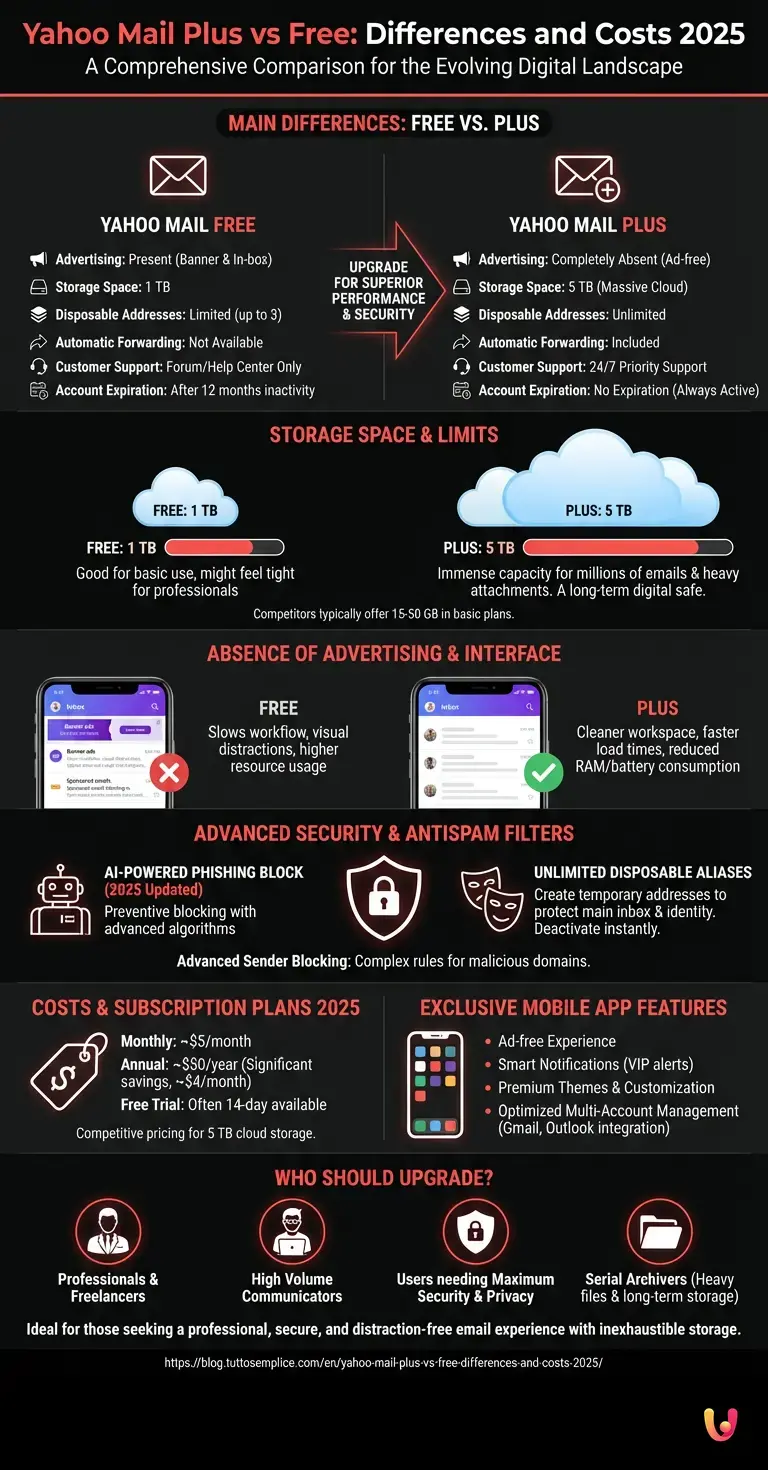
In 2025, the cost of a Yahoo Mail Plus subscription generally stands around 5 dollars per month, with significant discounts applicable for those who choose annual billing. A 14-day free trial is also often available to test all premium features.
The pricing structure has been designed to be competitive compared to other productivity services. By opting for the annual plan (which is around 50 dollars a year), the monthly cost drops to just over 4 dollars. Considering that purchasing 5 TB of cloud space on other platforms would cost tens of dollars per month, the value for money offered by Yahoo is extremely advantageous for those who need to archive huge amounts of text data and attachments.
Exclusive Features for the Mobile App

The Yahoo Mail Plus mobile application unlocks exclusive features such as advanced push notification customization, premium themes, and priority management of incoming emails, optimizing productivity directly from iOS or Android smartphones and tablets.
The mobile ecosystem is fundamental for modern professionals. The app for Plus subscribers does not just remove ads but offers superior organization tools:
- Smart Notifications: Ability to receive sound or visual alerts only for emails from specific contacts (e.g., the boss, family members, or VIP clients).
- Interface Customization: Access to a library of exclusive themes and layout options for the bottom navigation bar.
- Optimized Multi-Account Management: Smoother and faster integration of third-party accounts (Gmail, Outlook) within the same app, benefiting from Yahoo’s ad-free interface.
Who Should Upgrade?
Upgrading to Yahoo Mail Plus is mainly worthwhile for professionals, freelancers, and users who manage a high volume of daily communications. It is the ideal choice for those who need maximum security, zero advertising distractions, and practically inexhaustible storage space in the long run.
If you use email only occasionally to register for social networks or receive bills, the free 1 TB version is more than sufficient. However, the investment becomes highly recommended in the following scenarios:
- Intensive Work Use: If your email is your office, removing ads increases concentration and productivity.
- Sensitive Data Management: The need to create unlimited aliases is a godsend for those who want to maintain anonymity or protect themselves from aggressive spam.
- Serial Archivers: If you never delete an email and constantly receive heavy files (graphic projects, legal documents, videos), the 5 TB guarantees decades of worry-free usage.
In Brief (TL;DR)
Yahoo Mail Plus offers a completely ad-free experience, improving browsing speed and ensuring a clean interface without distractions.
This premium subscription guarantees five terabytes of cloud space and integrates advanced security filters with unlimited temporary email addresses.
Updated for 2025, the paid service costs about five dollars monthly and prevents profile deactivation while offering priority technical support.
Conclusions

In summary, choosing Yahoo Mail Plus means investing in a premium, secure email experience totally free of advertising interruptions. Evaluating the 2025 costs against the significant benefits offered in terms of space and privacy, it represents a highly recommended update for the most demanding users.
The email market is becoming increasingly oriented towards data protection and efficiency. Yahoo has managed to evolve its historic service by offering a Plus package that is not limited to a simple aesthetic restyling but provides concrete tools for advanced communication management. Whether it is securing your inbox with disposable addresses or enjoying an immaculate interface, switching to the paid version confirms itself as a valid and convenient strategic choice for those who make email a tool for daily life and work.
Frequently Asked Questions

In 2025, the cost to subscribe to Yahoo Mail Plus is around five dollars per month. Choosing annual billing brings the price down to about fifty dollars total, guaranteeing significant savings in the long run. Additionally, a fourteen-day free trial period is often offered to test all advanced features before confirming payment.
The basic free version offers one terabyte of space, while the Plus plan provides a massive five terabytes of dedicated cloud storage. This immense capacity is fundamental for professionals, as it allows for keeping millions of messages and very heavy multimedia attachments without ever having to worry about emptying the inbox.
The premium service integrates artificial intelligence algorithms that are constantly updated to preventively block phishing attempts and unwanted messages. It also offers the extraordinary ability to create unlimited disposable email addresses, perfect tools for signing up for newsletters or dubious websites while keeping the main inbox safe.
Completely removing annoying advertising banners guarantees a much cleaner work environment and decidedly faster web page loading times. On mobile devices, this total absence of promotional scripts drastically reduces memory and battery consumption, offering smooth navigation without visual distractions and optimized for daily productivity.
Switching to the paid version is warmly recommended for professionals, self-employed workers, and users who manage a very high volume of communications every day. It is indeed the ideal strategic choice for those who need maximum IT security, total absence of distractions, and practically inexhaustible storage space to keep historical archives and work documents.
Still have doubts about Yahoo Mail Plus vs Free: Differences and Costs 2025?
Type your specific question here to instantly find the official reply from Google.
Sources and Further Reading





Did you find this article helpful? Is there another topic you’d like to see me cover?
Write it in the comments below! I take inspiration directly from your suggestions.